
Download Litero – AI Writing Assistant for Academic Success
Overview
Litero is a web‑based AI writing assistant built specifically for students who want to sharpen their research and composition skills. Powered by a ChatGPT‑style co‑writer, Litero helps you generate original content while preserving your unique voice, a crucial factor for maintaining academic integrity. The platform offers an intuitive outline generator that simplifies topic selection, an AI Autosuggest feature that breaks through writer’s block, and a suite of citation tools that support popular styles such as MLA, APA, and Chicago.
Integrated plagiarism detection and real‑time grammar checking ensure that every draft meets the highest scholarly standards before you hit submit. While the core focus is on academic writing—essays, research papers, theses, and lab reports—Litero’s flexible toolset can also be leveraged for creative projects, business reports, and even personal blogging. The subscription model provides continuous updates, cloud‑based storage, and priority support, while a limited free tier lets users explore the basic interface before committing.
Although the service currently lacks a dedicated mobile app, its responsive web design works smoothly on desktop browsers, making it a reliable companion for study sessions at the library or at home. In short, Litero combines powerful AI assistance with rigorous academic safeguards, delivering a streamlined, secure, and user‑friendly experience that saves time and elevates the quality of student writing.
Key Features
- AI‑Powered Co‑Writer: Generates content suggestions, rephrases sentences, and expands ideas while keeping your personal tone intact.
- Outline Generator: Helps you structure essays and research papers by proposing logical headings, sub‑headings, and a logical flow.
- AI Autosuggest: Real‑time prompts that tackle writer’s block, suggest transitions, and recommend evidence‑based arguments.
- Citation Manager: Supports MLA, APA, Chicago, Harvard, and custom formats; inserts in‑text citations and builds a bibliography automatically.
- Plagiarism Detector: Scans your draft against a massive academic database to ensure originality and proper attribution.
- Grammar & Style Checker: Highlights errors, suggests style improvements, and provides explanations to help you learn.
- Export Options: Download completed documents as .docx, .pdf, .txt, or .rtf for seamless integration with university portals.
- Secure Cloud Storage: Saves drafts automatically, allowing you to resume work from any device without losing progress.
- Collaborative Workspace: Share documents with peers or mentors for real‑time feedback and co‑editing.
- Continuous Updates: Subscription includes regular AI model enhancements, new citation styles, and feature expansions.
Each feature is designed with the student workflow in mind. The AI co‑writer adapts to the subject matter, whether you’re drafting a philosophy essay or a biology lab report, offering discipline‑specific terminology and logical structuring. The outline generator reduces the time spent on planning by presenting a ready‑made skeleton that you can customize, while the autosuggest engine keeps ideas flowing during the writing phase. Citation management eliminates the tedious manual formatting that often leads to errors, and the plagiarism checker provides peace of mind before final submission. Together, these tools create an all‑in‑one environment that replaces the patchwork of separate grammar apps, reference managers, and note‑taking platforms, thereby simplifying the entire academic writing lifecycle.
Installation, Usage & Compatibility
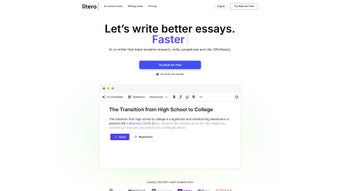
Because Litero is a cloud‑native service, there is no traditional installation process. To get started, simply visit litero.ai, create a free account, and verify your email address. After logging in, you’ll be taken to a clean dashboard where you can start a new document or import an existing file. The user interface follows a familiar word‑processor layout: a toolbar at the top houses AI tools, citation options, and export functions, while a side panel displays the outline generator and document statistics.
Step‑by‑step usage guide:
- Click “New Document” and select the type of assignment (e.g., essay, research paper, thesis).
- Enter your thesis statement or research question; the AI will suggest a preliminary outline.
- Accept or edit the outline, then start writing in the main editor. Use the “Co‑Writer” button to request paragraph expansions or rephrasing.
- Whenever you hit a snag, activate “Autosuggest” for instant ideas, transitions, or supporting evidence.
- Insert citations by highlighting text and choosing the appropriate style from the citation manager.
- Run the grammar checker and plagiarism scanner before finalizing the draft.
- Export the finished paper in your preferred format or save it directly to your cloud library.
Litero runs on any modern browser—Chrome, Firefox, Edge, Safari, or Opera—making it compatible with Windows 10/11, macOS Monterey and later, Linux distributions, and even ChromeOS. Although a native mobile app is not yet available, the responsive design adapts to tablet and smartphone screens, allowing you to review outlines or make minor edits on the go. Because all processing occurs on secure servers, the tool is safe for handling sensitive academic data, and all communications are encrypted via HTTPS.
Pros, Cons, FAQ & Conclusion
Pros
- Comprehensive AI assistance tailored for academic writing.
- Robust citation manager covering all major styles.
- Built‑in plagiarism detection and advanced grammar checking.
- Responsive web interface works on any desktop OS.
- Secure cloud storage with automatic versioning.
Cons
- No dedicated mobile app yet.
- Free tier offers limited access to premium AI features.
- Subscription required for full functionality may be a barrier for some students.
Frequently Asked Questions
Is Litero safe for confidential research data?
Yes. All documents are transmitted over HTTPS, stored in encrypted cloud servers, and never shared with third parties without your consent.
Can I use Litero for non‑academic writing?
Absolutely. While the platform is optimized for essays and research papers, its AI co‑writer, grammar checker, and export options work equally well for business reports, blog posts, and creative writing.
How does the plagiarism detector compare to other tools?
Litero’s detector scans against a vast academic database and provides similarity scores with source links, offering accuracy comparable to leading standalone plagiarism services.
What browsers are supported?
All current versions of Chrome, Firefox, Edge, Safari, and Opera are fully supported. The interface adapts to both desktop and tablet screens.
Is there a discount for students?
Litero offers a special student pricing tier that reduces the monthly subscription cost by 20 % when a valid .edu email address is provided.
Conclusion & Call to Action
In the competitive landscape of AI writing tools, Litero stands out by marrying powerful language models with rigorous academic safeguards. Its seamless outline creation, citation automation, and plagiarism detection make it an indispensable ally for anyone serious about producing high‑quality scholarly work. While the lack of a mobile app and the subscription model may deter some, the value delivered—time savings, improved grades, and confidence in originality—justifies the investment for most students. Ready to transform your writing process? Sign up for a free trial today and experience the future of academic writing.
Litero delivers a comprehensive suite of AI‑driven writing tools that cater specifically to students. The citation manager and plagiarism checker are especially valuable, and the intuitive interface makes adoption painless. The only drawback is the absence of a dedicated mobile app, but the responsive web design mitigates this limitation.






